이마트앱 프로젝트의 프론트엔드에서는 현재 Vuex를 활용하여 상태 관리를 진행하고 있습니다. Vuex는 Vue2에서 가장 널리 사용되는 상태 관리 라이브러리입니다.
문제 제기
토스트 팝업의 정보를 가지고 있는 toast 객체가 있습니다.
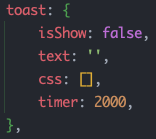
내부 프로퍼티에 default 값을 지정해주었기 때문에 typescript가 알아서 타입을 추론합니다.
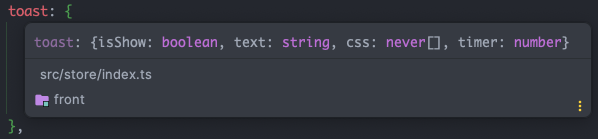
타입 시스템이 제대로 작동한다면 toast의 파라미터인 isShow는 boolean 타입으로 추론되어야 합니다. 그러나 any 타입으로 추론된 것을 확인할 수 있습니다. (자바스크립트는 컴파일 시 타입이 지정되지 않는 정적 프로그래밍 언어이기 때문에, 타입스크립트를 적용하고 타입을 지정하지 않으면 모든 타입을 허용하는 any 타입으로 지정됩니다.)
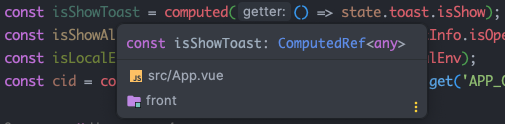
뿐만아니라 모듈 추적도 정상적으로 이루어지지 않았습니다.

정상적인 타입 추론과 원활한 모듈 탐색을 위해 상태 관리 라이브러리를 마이그레이션할 필요성이 있었습니다.
pinia를 적용한다면?
만약 pinia라는 상태관리 라이브러리를 적용하면 어떻게 될까요?
store 객체에서 지정해준 타입을 정상적으로 추론해줍니다.

또한, Vuex가 모든 store를 모듈화하여 하나의 Vuex store 객체로 관리하는 것과는 달리, Pinia는 각 store가 객체를 만들어 직접 호출됩니다. 이로 인해 모듈 추적이 더욱 편리해집니다.
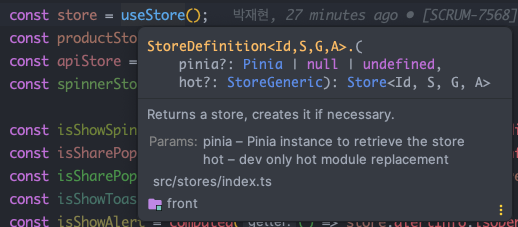
따라서, pinia를 사용하면 vue3에서 Typescript를 최대한 활용할 수 있습니다. 이로 인해 코드의 안정성이 향상되고 개발자의 의도가 명확하게 전달되어, 유지보수가 보다 쉬운 프로젝트를 구현할 수 있습니다.
왜 pinia 인가?
vue3와 typescript가 지원하는 상태관리 라이브러리 중에서 pinia를 선택하는 이유는 명확합니다.
vue.js 공식문서의 State Management 섹션을 보면, vue에서 상태관리 라이브러리를 vuex에서 pinia로 공식적으로 변경했다는 사실을 확인할 수 있습니다. 더욱이,** vuex는 이제 유지 관리 모드에 들어가며 새로운 기능 추가는 없을 것이라는 점**을 통해, 앞으로 vue는 vuex가 아닌 pinia와 함께 업데이트될 것임을 추론할 수 있습니다.
https://vuejs.org/guide/scaling-up/state-management.html
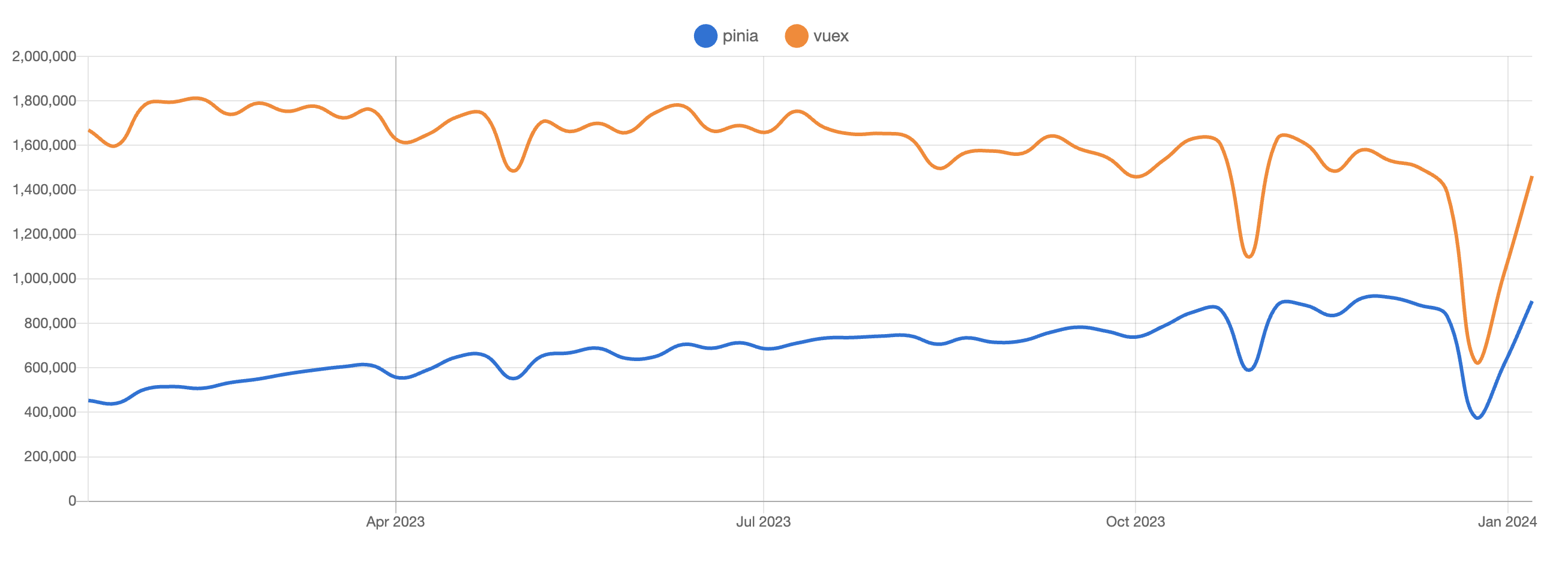
다운로드 추세를 확인하면, Pinia가 Vuex를 거의 비슷한 수준에서 추적하고 있으며 점점 상승하고 있다는 것을 알 수 있습니다.
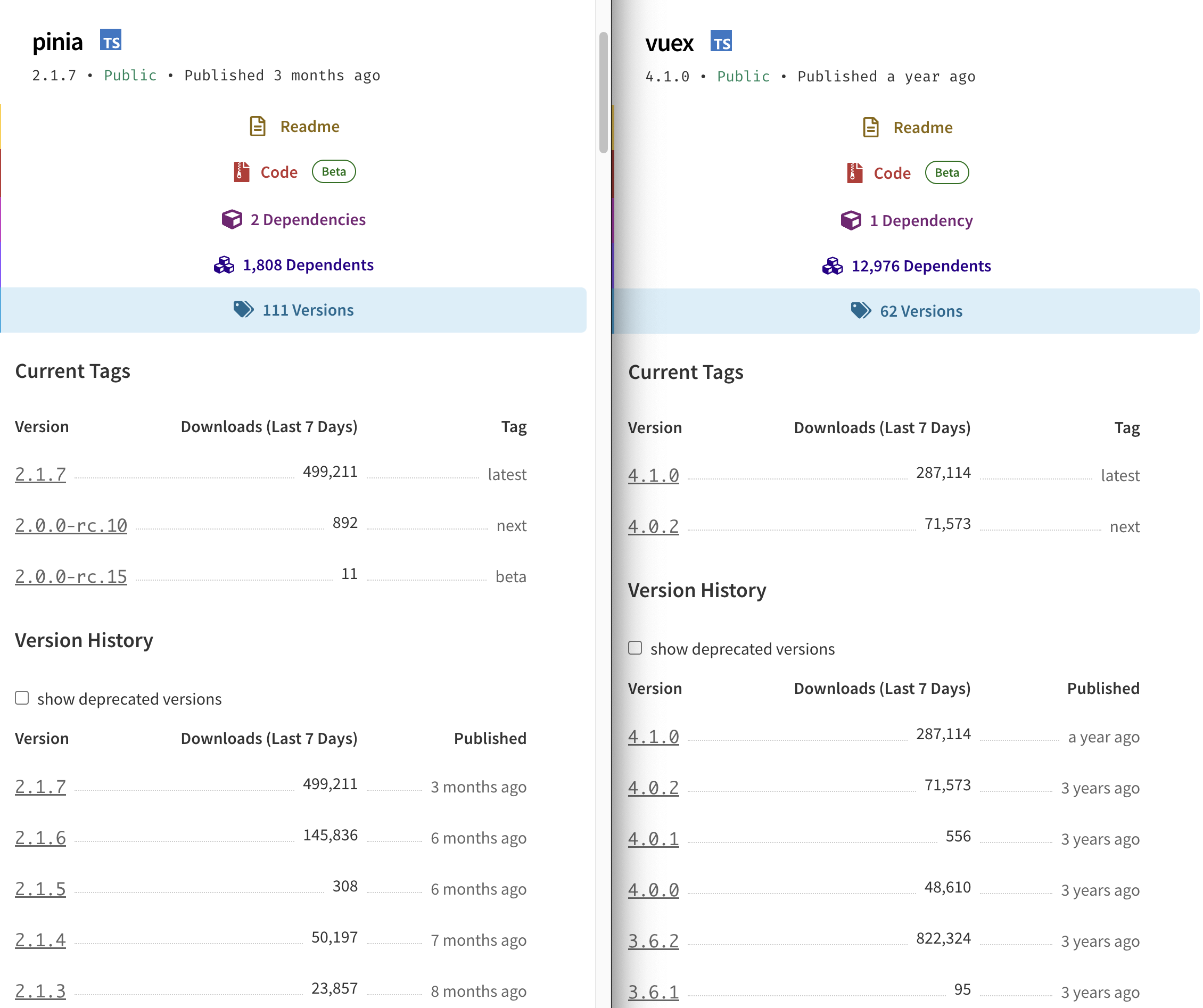
또한, vuex가 1년 전에 업데이트가 종료된 반면, pinia는 1~3개월 주기로 꾸준히 업데이트되고 있음을 확인할 수 있습니다.
pinia의 장점은 아래와 같습니다.
- Devtools 지원
- actions, mutations를 추적하는 타임라인
- 스토어는 사용되는 컴포넌트에 표시됨
- 시간 추적 및 더 쉬운 디버깅
- 핫 모듈 교체 (HMR)
- 페이지를 새로고침하지 않고 스토어 수정
- 개발하는 동안 기존 상태 유지
- 플러그인: 플러그인으로 피니아 기능 확장
- TypeScript 지원 또는 JS 사용자를 위한 적절한 자동 완성
- SSR 지원
Vuex
장점
- Vue2 생태계 표준
- 대규모 커뮤니티 레퍼런스
- 기존 프로젝트 호환
고려할 점
- TypeScript 타입 추론 실패 (any)
- 모듈 추적 불가
- 유지관리 모드 (신규 기능 없음)
- mutation 보일러플레이트
Pinia
장점
- 완벽한 TypeScript 타입 추론
- 모듈 추적 정상 작동
- Vue 공식 상태관리 라이브러리
- mutation 불필요 (코드 응집도 향상)
- Devtools/HMR/SSR 지원
고려할 점
- Vuex 대비 마이그레이션 공수 필요
- 팀 학습 비용
Vue의 창시자인 Evan You가 Vue의 업데이트 내용을 소개하면서 Pinia에 대해 언급한 부분이 있습니다. 이 부분을 참고하면 추가적인 기능에 대해 이해하는데 도움이 될 것입니다.
vuex와 pinia의 차이점
vuex와의 큰 차이점은 두 가지가 있습니다.
모듈 시스템이 아닌 각각의 모듈에서 각각의 store 객체를 생성합니다
1개의 store 객체와 모듈화를 통해 동작했던 vuex와는 다르게, pinia에서는 각각의 모듈이 각각의 store 객체를 가지고 있고, template에서는 각각의 store 객체를 파일 별로 직접 호출하게 됩니다.
따라서, 디렉토리 구조를 아래와 같이 변경하게 됩니다.
# Vuex 예제 (네임스페이스 모듈 가정)
src
└── store
    ├── index.js           # Vuex 초기화, 모듈 가져오기
    └── modules
        ├── module1.js     # 'module1' 네임스페이스
        └── nested
            ├── index.js   # 'nested' 네임스페이스, module2 및 module3 가져오기
            ├── module2.js # 'nested/module2' 네임스페이스
            └── module3.js # 'nested/module3' 네임스페이스

# Pinia 등가물, id와 이전 네임스페이스가 일치함을 유의하세요
src
└── stores
    ├── index.js          # (선택사항) Pinia 초기화, 스토어 가져오지 않음
    ├── module1.js        # 'module1' id
    ├── nested-module2.js # 'nestedModule2' id
    ├── nested-module3.js # 'nestedModule3' id
    └── nested.js         # 'nested' id
api store들은 폴더 하나에 묶여있는게 파악하기 좋을 것 같아 아래와 같은 디렉토리 구조를 적용하였습니다.
src
└── stores
    ├── index.js
    ├── module1.js        # 'module1' id
    ├── module2.js        # 'module2' id
    └── api
			   ├── module1.js   # 'module1Api' id
				 └── module2.js   # 'module2Api' id
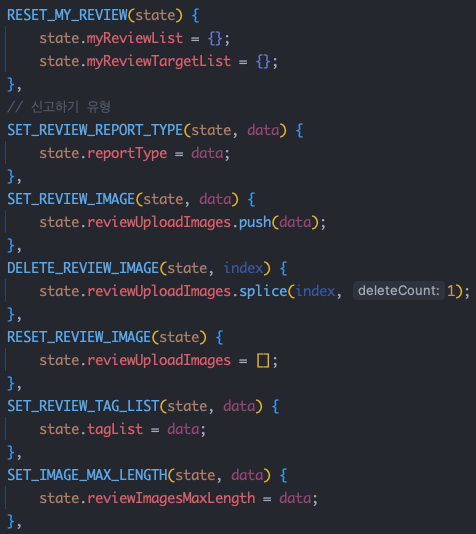
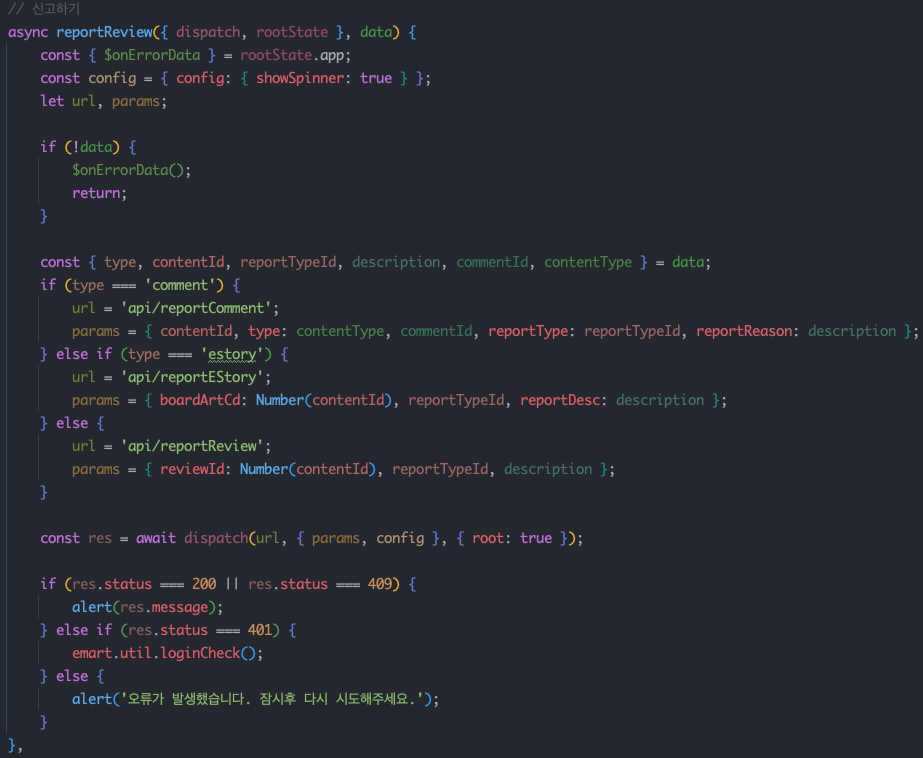
mutation이 삭제됩니다
Vuex는 mutations와 actions라는 두 가지 편리한 함수 선언 옵션을 제공합니다. (두 옵션의 차이점은 여기서는 따로 설명하지 않겠습니다.) 일반적으로 mutations에 선언된 함수들은 store의 state를 관리하는데 활용되고, actions에 선언된 함수들은 컴포넌트에서 호출하는데 이용됩니다.
mutation의 존재 이유는 여러 가지일 수 있지만, 개인적으로는 state를 외부에서 바꾸지 못하게 하는 캡슐화에 중점을 둔다고 생각합니다. 하지만, action에서 직접 state를 바꾸지 않고 mutation을 사용해 state를 바꾸게 되면, mutation 함수 대부분은 state 변환을 위한 한 줄짜리 함수로 이루어집니다.
이런 점 때문에, mutation에 선언된 함수들의 의미가 크게 없어지고, 이는 코드의 응집력을 약하게 만드는 단점이 됩니다.
- Vuex Store 분석
- Store ID 매핑
- state/getters 이관
- mutations → actions 병합
- 컴포넌트 호출부 변경
pinia 적용 방법
vuex에서 pinia로의 마이그레이션 방법은 pinia의 공식 문서인 Vuex ≤4에서 마이그레이션하기를 참조하면 간편하게 변경할 수 있습니다.
store 객체를 생성하는 방법에는 option store와 setup store 두 가지가 있습니다. 이번에는 이마트 앱에 적용된 option store에 대해서 설명하겠습니다.
다음은 vuex로 구현한 store와 pinia로 마이그레이션한 store의 예시입니다.
// Vuex의 'auth/user' 네임스페이스 모듈
import { Module } from 'vuex'
import { api } from '@/api'
import { RootState } from '@/types' // Vuex 유형 정의를 사용하는 경우

interface State {
  firstName: string
  lastName: string
  userId: number | null
}

const storeModule: Module<State, RootState> = {
  namespaced: true,
  state: {
    firstName: '',
    lastName: '',
    userId: null
  },
  getters: {
    firstName: (state) => state.firstName,
    fullName: (state) => `${state.firstName} ${state.lastName}`,
    loggedIn: (state) => state.userId !== null,
    // 다른 모듈에서 가져온 일부 상태와 결합합니다.
    fullUserDetails: (state, getters, rootState, rootGetters) => {
      return {
        ...state,
        fullName: getters.fullName,
        // `auth`라는 다른 모듈에서 상태를 읽어옵니다.
        ...rootState.auth.preferences,
        // `auth` 아래에 중첩된 `email`이라는 네임스페이스 모듈에서 게터를 읽어옵니다.
        ...rootGetters['auth/email'].details
      }
    }
  },
  actions: {
    async loadUser ({ state, commit }, id: number) {
      if (state.userId !== null) throw new Error('Already logged in')
      const res = await api.user.load(id)
      commit('updateUser', res)
    }
  },
  mutations: {
    updateUser (state, payload) {
      state.firstName = payload.firstName
      state.lastName = payload.lastName
      state.userId = payload.userId
    },
    clearUser (state) {
      state.firstName = ''
      state.lastName = ''
      state.userId = null
    }
  }
}

export default storeModule
// Pinia 스토어
import { defineStore } from 'pinia'
import { useAuthPreferencesStore } from './auth-preferences'
import { useAuthEmailStore } from './auth-email'
import vuexStore from '@/store' // 점진적 변환을 위해, fullUserDetails 참조

interface State {
  firstName: string
  lastName: string
  userId: number | null
}

export const useAuthUserStore = defineStore('authUser', {
  // 함수로 변환
  state: (): State => ({
    firstName: '',
    lastName: '',
    userId: null
  }),
  getters: {
    // firstName getter 제거, 더 이상 필요하지 않음
    fullName: (state) => `${state.firstName} ${state.lastName}`,
    loggedIn: (state) => state.userId !== null,
    // `this`를 사용하기 때문에 반환 유형을 정의해야 합니다.
    fullUserDetails (state): FullUserDetails {
      // 다른 스토어 가져오기
      const authPreferencesStore = useAuthPreferencesStore()
      const authEmailStore = useAuthEmailStore()
      return {
        ...state,
        // 다른 getter 함수들은 이제 `this`를 통해 접근할 수 있습니다.
        fullName: this.fullName,
        ...authPreferencesStore.$state,
        ...authEmailStore.details
      }

      // 만약 다른 모듈들이 여전히 Vuex에 있다면 대안이 있습니다.
      // return {
      //   ...state,
      //   fullName: this.fullName,
      //   ...vuexStore.state.auth.preferences,
      //   ...vuexStore.getters['auth/email'].details
      // }
    }
  },
  actions: {
    // 첫 번째 인수로 컨텍스트를 사용하는 대신 `this`를 사용하세요.
    async loadUser (id: number) {
      if (this.userId !== null) throw new Error('Already logged in')
      const res = await api.user.load(id)
      this.updateUser(res)
    },
    // 변이(mutations)는 이제 액션(actions)으로 변할 수 있으며, 첫 번째 인수로 `state` 대신 `this`를 사용하세요.
    updateUser (payload) {
      this.firstName = payload.firstName
      this.lastName = payload.lastName
      this.userId = payload.userId
    },
    // `$reset`을 사용하여 쉽게 상태(state)를 재설정할 수 있습니다.
    clearUser () {
      this.$reset()
    }
  }
})
전체 구조를 한 번에 이해하기는 어려우므로, store 객체의 생성 방법부터 단계별로 설명하겠습니다.
Pinia는 Vue2에서도 작동합니다. Store 객체의 id를 생성할 때, 기존에 사용하던 id를 그대로 사용하면 Vuex의 mapActions, mapStates 등의 메서드를 Pinia의 mapStores()로 쉽게 변경할 수 있습니다.
// Vuex
const storeModule: Module<State, RootState> = {
// Pinia
export const useAuthUserStore = defineStore('authUser', {
state, getter는 기존과 거의 동일하게 유지됩니다. 단, pinia로 변경하면서 state를 직접 호출할 수 있게 되므로, state 값을 그대로 반환하는 getter는 삭제합니다. 예) firstName: (state) => state.firstName
rootState, rootGetters의 경우에는 store의 state를 직접 호출하여 사용합니다.
// Vuex
const storeModule: Module<State, RootState> = {
  namespaced: true,
  state: {
    firstName: '',
    lastName: '',
    userId: null
  },
	getters: {
    firstName: (state) => state.firstName,
    fullName: (state) => `${state.firstName} ${state.lastName}`,
    loggedIn: (state) => state.userId !== null,
    // 다른 모듈에서 가져온 일부 상태와 결합합니다.
    fullUserDetails: (state, getters, rootState, rootGetters) => {
      return {
        ...state,
        fullName: getters.fullName,
        // `auth`라는 다른 모듈에서 상태를 읽어옵니다.
        ...rootState.auth.preferences,
        // `auth` 아래에 중첩된 `email`이라는 네임스페이스 모듈에서 게터를 읽어옵니다.
        ...rootGetters['auth/email'].details
      }
    }
  },
// Pinia
export const useAuthUserStore = defineStore('authUser', {
  // 함수로 변환
  state: (): State => ({
    firstName: '',
    lastName: '',
    userId: null
  }),
	getters: {
    // firstName getter 제거, 더 이상 필요하지 않음
    fullName: (state) => `${state.firstName} ${state.lastName}`,
    loggedIn: (state) => state.userId !== null,
    // `this`를 사용하기 때문에 반환 유형을 정의해야 합니다.
    fullUserDetails (state): FullUserDetails {
      // 다른 스토어 가져오기
      const authPreferencesStore = useAuthPreferencesStore()
      const authEmailStore = useAuthEmailStore()
      return {
        ...state,
        // 다른 getter 함수들은 이제 `this`를 통해 접근할 수 있습니다.
        fullName: this.fullName,
        ...authPreferencesStore.$state,
        ...authEmailStore.details
      }

      // 만약 다른 모듈들이 여전히 Vuex에 있다면 대안이 있습니다.
      // return {
      //   ...state,
      //   fullName: this.fullName,
      //   ...vuexStore.state.auth.preferences,
      //   ...vuexStore.getters['auth/email'].details
      // }
    }
  },
mutations을 삭제하거나 actions로 옮겨줍니다.
// Vuex
	actions: {
    async loadUser ({ state, commit }, id: number) {
      if (state.userId !== null) throw new Error('Already logged in')
      const res = await api.user.load(id)
      commit('updateUser', res)
    }
  },
  mutations: {
    updateUser (state, payload) {
      state.firstName = payload.firstName
      state.lastName = payload.lastName
      state.userId = payload.userId
    },
    clearUser (state) {
      state.firstName = ''
      state.lastName = ''
      state.userId = null
    }
  }
// Pinia
	actions: {
    // 첫 번째 인수로 컨텍스트를 사용하는 대신 `this`를 사용하세요.
    async loadUser (id: number) {
      if (this.userId !== null) throw new Error('Already logged in')
      const res = await api.user.load(id)
      this.updateUser(res)
    },
    // 변이(mutations)는 이제 액션(actions)으로 변할 수 있으며, 첫 번째 인수로 `state` 대신 `this`를 사용하세요.
    updateUser (payload) {
      this.firstName = payload.firstName
      this.lastName = payload.lastName
      this.userId = payload.userId
    },
    // `$reset`을 사용하여 쉽게 상태(state)를 재설정할 수 있습니다.
    clearUser () {
      this.$reset()
    }
컴포넌트에서 어떻게 호출하는지 알아보겠습니다.
앞서 언급했던 것처럼, pinia에서는 모듈을 타고 들어가지 않고 각 파일 내에 선언된 store 객체를 직접 호출합니다.
// Vuex
import { defineComponent, computed } from 'vue'
import { useStore } from 'vuex'

const store = useStore()

const firstName = computed(() => store.state.auth.user.firstName)
const fullName = computed(() => store.getters['auth/user/fullName'])
// Pinia
import { defineComponent, computed } from 'vue'
import { useAuthUserStore } from '@/stores/auth-user'

const authUserStore = useAuthUserStore()

const firstName = computed(() => authUserStore.firstName)
const fullName = computed(() => authUserStore.fullName)